
How do I export a shooting schedule?
On the Stripboard, click Download XLSX and the schedule downloads to Excel with the columns you have showing; the calendar and the DOOD report each download from the Excel (XLSX) button on their own screens.
Steps
-
Click the Scheduling tab in the top menu; the Stripboard opens. If you have more than one schedule, pick the right one from the list in the toolbar.
-
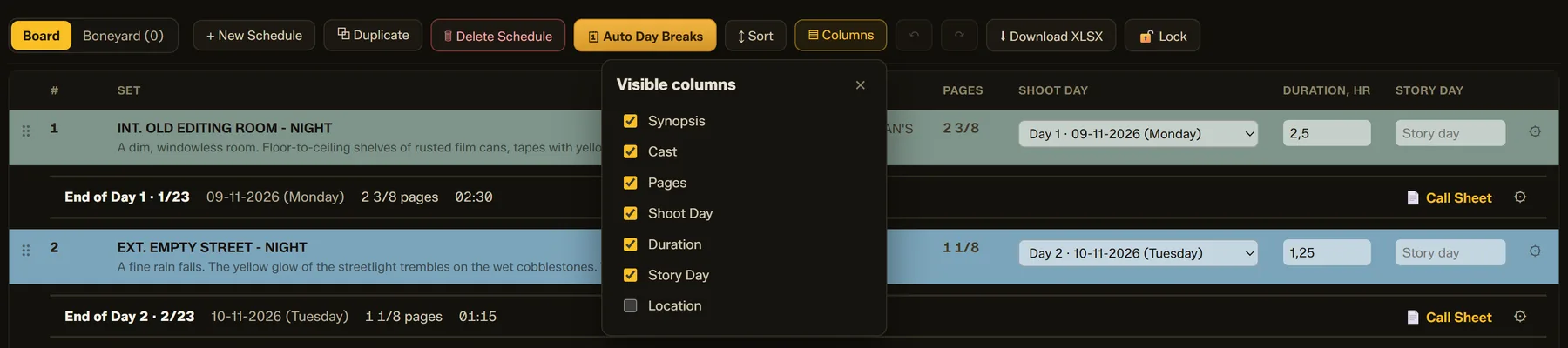
If there are columns you don’t want in the file, click ▤ Columns and untick them.
-
Click Download XLSX in the toolbar. The file downloads in a new tab.
In the file, each day starts with a dark header row: day number, date, page and time totals. Below it come the strips in their board colours, banners marked ▤, and days off and holidays as Day Off rows. The Boneyard strips sit in a separate section at the end.
- The day, scene and set columns are always there. Synopsis, Cast, Pages, Duration, Story Day and Location go into the file when they’re showing on screen.
- Pages are written in the project’s page unit.
- The time in a day’s header row is the strips’ durations only. Banner durations aren’t added, so it can differ from the end-of-day row on the board.
Calendar
-
Hover over Scheduling in the top menu and choose Calendar.
-
Click Excel (XLSX) above the calendar.

The file has one calendar block for each month the schedule covers. Shooting days show the day number, scene count and page total, plus any banners. Days off and holidays in between are marked Day Off.
DOOD
- Hover over Scheduling in the top menu and choose Day Out of Days.
- Open the Grid or Summary view. Pick a category if you like.
- Click Excel (XLSX). The open view downloads. More: What does the Day Out of Days report show?
Every file opens with a cover page carrying the project details. The file name has the project name, dekupa and the date.
If it doesn’t work
- I clicked the button but nothing downloaded.
- The file downloads by opening in a new tab. If your browser blocked the pop-up, allow it for this site from the notice in the address bar and click the button again.
- The calendar or DOOD Excel file won’t build.
- Both files need at least one shooting day in the schedule. Spread your scenes across days first, then try again.
- There’s no Download XLSX button.
- If the project is shared with you read-only, the button doesn’t show. Ask the project owner for Edit on the Schedule row. To download the file you also need at least View on the Export row.