
What does the Day Out of Days report show?
The Day Out of Days screen works out from your schedule which shooting days each cast member and element works, which days they’re on hold, and their first and last day; both the Grid and Summary views download to Excel.
Steps
- Hover over Scheduling in the top menu and choose Day Out of Days. The screen is headed
Day Out of Days (DOOD)
. - If the project has more than one schedule, pick one from the list at the start of the toolbar.
- To narrow the list, pick a category from the All categories list, or type a name in the Search element… box.
- Switch between Grid and Summary.
Grid
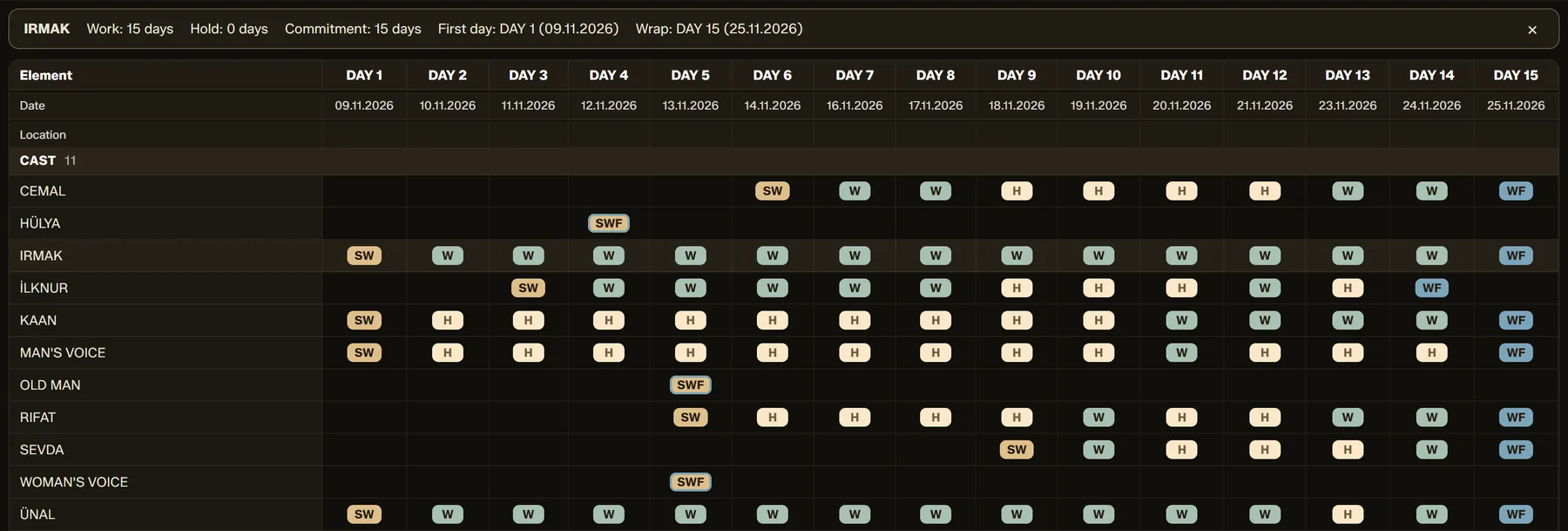
Rows are elements, grouped by category. Cast comes first, in cast number order. Columns are shooting days: day number, date and, if set, location. The code in a cell describes that day:
- SW: the element’s first work day.
- W: a work day.
- WF: the last work day.
- SWF: works a single day.
- H: a hold day between the first and last day, when the element doesn’t work.
Hover over a cell to see the numbers of the scenes shot that day. Click an element’s name and a summary opens at the top: Work, Hold, Commitment, First day and Wrap. Commitment is the number of shooting days from the first to the last day, both included.
Tick Hide empty days to hide the days with no code anywhere in the list.
Summary
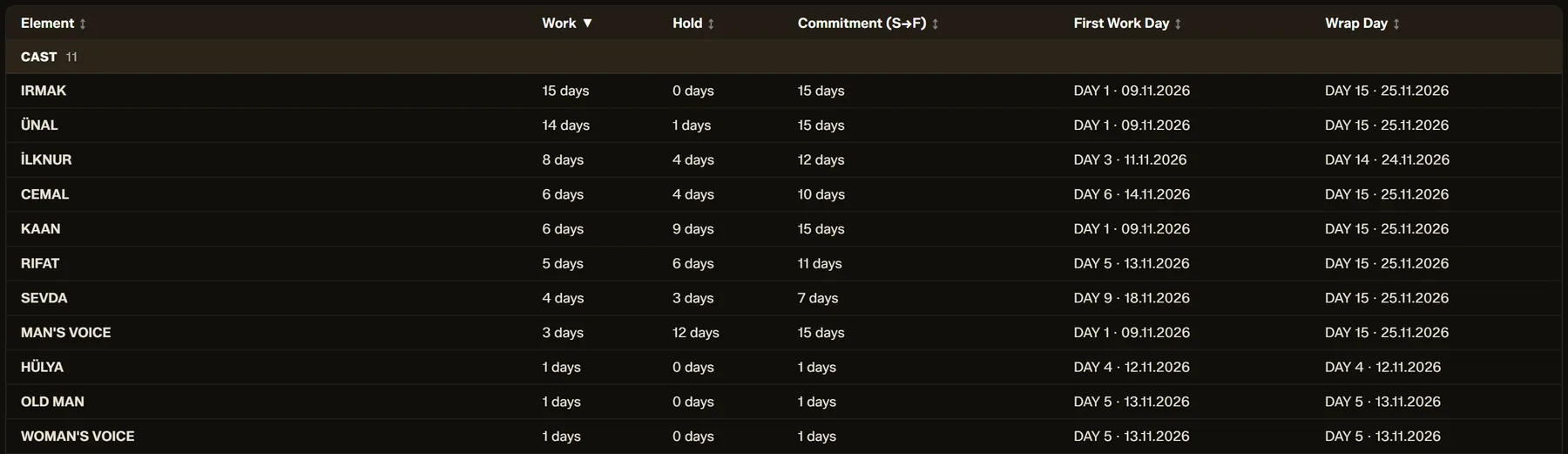
Each element is one row: Work, Hold, Commitment (S→F), First Work Day, Wrap Day.
Click a column header to sort. The first click sorts largest first (names from the end of the alphabet), the second smallest first, and the third goes back to the original order. Sorting happens within each category.
Excel
The Excel (XLSX) button downloads the view that’s open. With Grid open you get the day-by-day coded grid; with Summary open, the summary. If you picked a category, only that category goes into the file. The search box and Hide empty days don’t affect the file; every day is included. More: How do I export a shooting schedule?
If it doesn’t work
- The report is empty, or a cast member is missing.
- The report only looks at scenes placed on shooting days. A scene in the Boneyard, or a cast member who isn’t tagged in that scene, doesn’t make the list. Move the scene onto a day or add the tag.
- The Excel (XLSX) button is greyed out.
- On a project shared with you, you need Edit on the Schedule row to download the Excel file. Ask the project owner.
- How do I mark travel and rehearsal days?
- You can’t yet. The codes come only from the schedule and can’t be edited by hand: work, hold, first day and last day.