
How do I edit budget line items?
Click the arrow at the left of an account row to open its line items, then fill in Quantity, the multiplier, Unit and Rate; a line’s total is quantity × multiplier × rate, and it saves as soon as you leave the field.
Steps
-
In the Budgeting tab, click the ▸ arrow at the far left of an account row. The account’s line items open.
-
Click the cell you want to change and type the value: Description, Quantity, the multiplier in the × column, Unit and Rate.
-
Press Enter or click somewhere else. The value is saved, and the totals for the line, the account, the section and the Grand Total update.

A line’s total works like this: Quantity × multiplier × Rate. For example, number of cast, shoot days and day rate. If you don’t need the multiplier, leave it as it is. Unit is only a label and doesn’t change the total.
Adding and deleting line items
- The + Line Item button on the account row adds a line called New line item at the end of the account. If the account is collapsed, click the arrow to see it, then type its description and figures.
- The × button at the far right of a line deletes it. You’re not asked to confirm.
Pulling from the breakdown
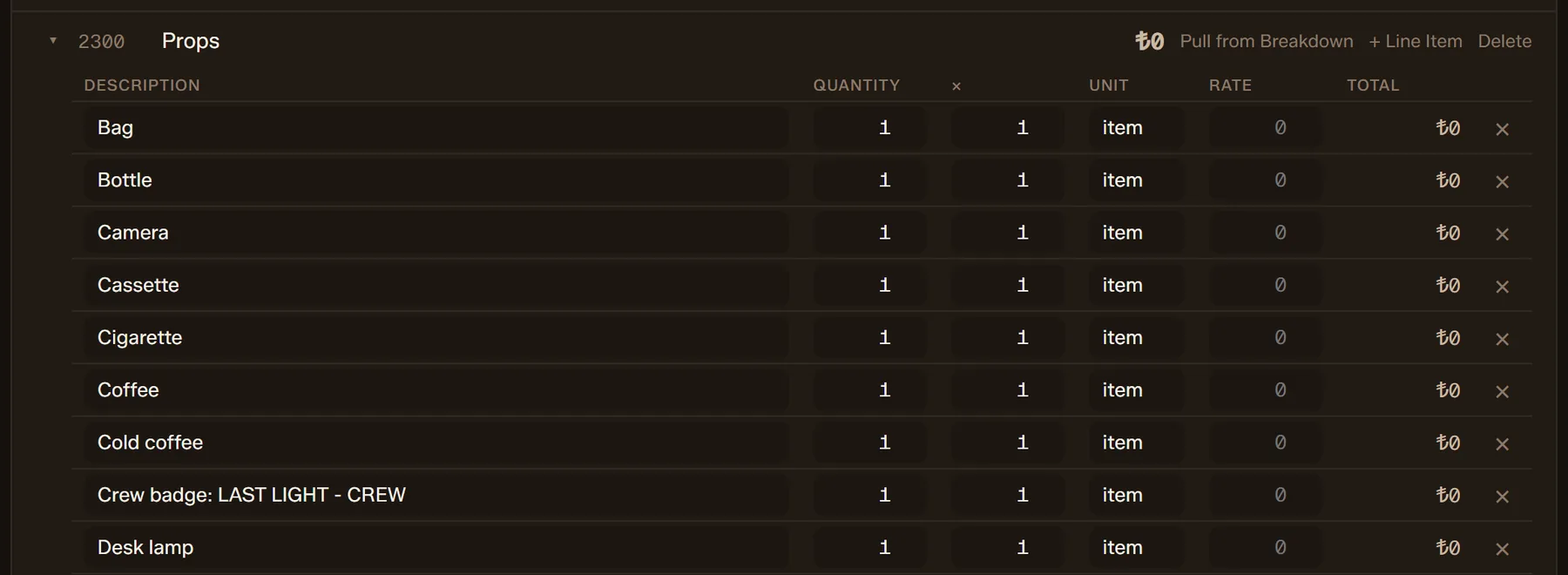
On accounts that count elements, the Pull from Breakdown button on the account row splits the single summary line into one line per element in the breakdown. Each line comes in with the element’s name, and you fill in its rate. The app asks before it replaces the summary line. Lines you added by hand stay as they are. The button only shows on the six accounts below.
| Account | Breakdown category |
|---|---|
| Extras | Extras |
| Art / Set | Set, Set Dressing |
| Props | Props |
| Wardrobe / Makeup & Hair | Wardrobe, Makeup & Hair |
| Vehicles & Transport | Vehicles |
| SFX / VFX / Stunts | SFX, VFX, Stunts |
If you add new elements to the breakdown and click the button again, only the new elements are added. Lines that came from the breakdown and lines you added by hand stay as they are, rates included. If the breakdown has nothing new, the app says so and leaves the account alone.
Accounts
- Click an account’s name to type a new one.
- + Custom Account at the bottom of a section adds a new account to it. Your browser asks for the account’s name first, then its code.
- Delete on the account row deletes the account with all its line items. You’re asked to confirm first.
To give line items an engagement type and a VAT rate: How does the detailed budget work?
If it doesn’t work
- I clicked Pull from Breakdown and the account didn’t change.
- If the breakdown has no new elements for this account, the app says so and leaves the account alone. Add elements in the matching category of the breakdown first. The button only shows on accounts that count elements from the breakdown: Extras, Art / Set, Props, Wardrobe / Makeup & Hair, Vehicles & Transport and SFX / VFX / Stunts.
- I can’t type in the cells and the buttons are missing.
- The project is shared with you and you can only view the budget. You can read it but not change it, and a note at the top of the screen says so. Ask the project owner for Edit on Budget.