
The AI breakdown stopped partway. What should I do?
Check the card in the left panel, which says why it stopped; the tags made so far are saved, and once the cause is sorted, Retry for the remaining scenes picks up from the scene where it stopped without charging again for scenes already done.
What the card says
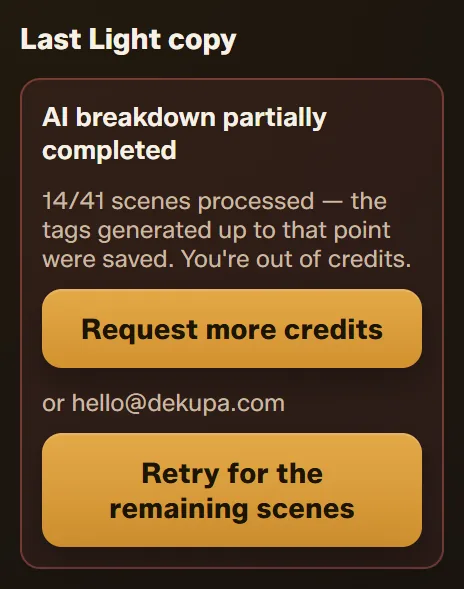
AI breakdown partially completed
withYou're out of credits.
Your credits ran out during the breakdown. The card shows a Request more credits button and the hello@dekupa.com address.AI breakdown partially completed
with the free plan limit. Your plan doesn’t cover the full breakdown, and the card shows a link to get in touch with us. Plans: pricing pageInsufficient credits
The breakdown never started because your balance is empty.- The card shows Start AI Breakdown again with a short error note below it. The AI service failed on a scene and the breakdown stopped there. If the note says
The AI service is busy right now. Try again in a few minutes.
the service is busy.
Processing the remaining scenes
- Sort out the cause: add credits or wait a few minutes.
- Click Retry for the remaining scenes on the card. If an error stopped the breakdown, the button says Start AI Breakdown instead and does the same thing.
- The breakdown picks up from where it stopped. Scenes already processed are skipped and not charged again.
- When it’s done the card goes away. To check the tags: How do I review the tags the AI added?
Good to know
- A script’s AI breakdown completes once. After that it can’t be started again for the same script. In a series, each episode has its own breakdown.
- Only one breakdown runs per script at a time. You can’t start a second one while one is running.
- If your balance won’t cover the whole breakdown, the card says how many scenes it will cover before you start. The breakdown stops at that point. How credits are counted: What are credits, and when are they spent?
If it doesn’t work
- There’s no breakdown card in the left panel.
- While the breakdown runs, you see AI breakdown running above the script instead of the card. Once the breakdown is complete, the card goes away. On a project shared with you, only members allowed to spend credits see the card.
- AI breakdown running has been stuck on the same scene count for a long time.
- If the server restarted, the breakdown resumes by itself 10 minutes after its last progress, from where it stopped. At busy times it can also wait in line before starting. Refresh the page. If it doesn’t move at all for a long time, write to hello@dekupa.com with the project name.
- I retried and it stopped again.
- The cause may still be there. If your balance ran out again, the card says: You're out of credits. Check your balance on the credit badge in the top bar. If the AI service is failing, wait a few minutes. If it keeps happening, write to hello@dekupa.com with the project name.