
Scene headings or scene breaks came out wrong. What now?
If one heading’s text or number is wrong, fix it with the pencil (✎) button on the scene’s row in the left panel; if scenes were split in the wrong place, fix the heading in your writing software and upload the script as a new version from the Versions screen.
How headings are read
- English:
INT. LIBRARY - DAY,EXT. STREET - NIGHT,INT - DAY / TV STUDIO,SCENE 12A EXT. - Turkish:
İÇ. KÜTÜPHANE - GÜN,DIŞ. SOKAK - GECE,İÇ/DIŞ. ARABA - GECE, and the long formSAHNE 12 - SOKAK - DIŞ/GÜN. - The scene number can sit at the start or the end of the heading.
- In the time slot, words such as DAY, NIGHT, GÜN, GECE, SABAH and AKŞAM are recognised.
- In an FDX, a new scene only starts at a line marked as a Scene Heading in Final Draft.
If one heading’s text or number is wrong
-
In the scene list in the left panel, hover over the scene’s row. A pencil (✎) button appears on the right: click it. Double-clicking the row opens the same window.
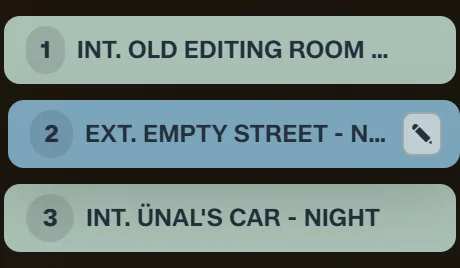
-
In the Update scene window, correct the Heading field. If the number is wrong, type the right one in Scene #.
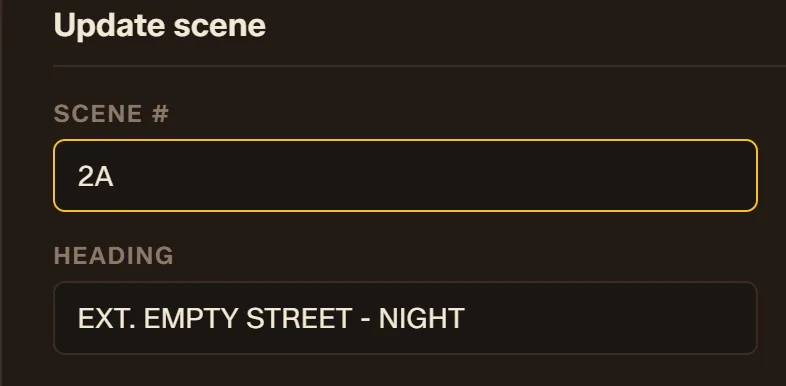
-
Click Save. The page reloads and the scene list shows the new heading.
INT/EXT, the location and the time of day are read from this heading. The strip colour on the stripboard follows it too.
If scenes were split in the wrong place
If two scenes came out as one, the heading of the second wasn’t recognised. If there’s an extra scene, a line that isn’t a heading was read as one.
- Fix that line in your writing software. If it’s a heading, put it in one of the forms above. If it isn’t, make sure it doesn’t look like one, for example by not starting it with INT. or EXT. in capitals.
- Export the script again as FDX or PDF.
- In the top menu, open Versions under Script and add the file with Upload New Version. Only the project owner can upload a new version.
- When the new version is ready, the screen tells you how many tags were carried over and how many items are waiting for review. Tags are carried over to the new scenes wherever possible.
These aren’t errors
- Lines such as
BÖLÜM 1orBÖLÜM SONU(episode markers) don’t start a scene and stay as action. - Notes such as
SAHNE 5 - VE 6 PARALEL İLERLER(scenes 5 and 6 run in parallel) aren’t counted as scenes. - The title page sits at the top of the list as Title page and can’t be edited.
If it doesn’t work
- The pencil (✎) button is missing or does nothing.
- The button appears when you hover over the row. Scenes can’t be edited while an AI breakdown is running, so wait for it to finish. If you don’t have permission to edit the script, the button isn’t shown: let the project owner know.
- I fixed the heading but the set tag still has the old name.
- The set tag is taken from the heading when the script is read. Changing the heading later doesn’t change the tag, so fix the tag separately.
- I uploaded a new version and the scenes are still split wrong.
- Compare the heading where the split goes wrong with the forms below, and in an FDX check the line’s element type. If it still doesn’t work, write to hello@dekupa.com with the project name and the scene numbers. You don’t need to send the script file.