
How do I change my password?
Click the round account button at the top right, open Change password, then enter your current password and a new one of at least 8 characters.
If you know your password
-
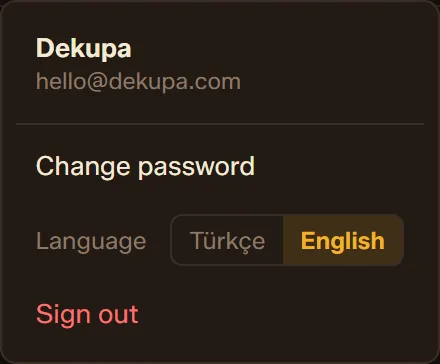
Click the round account button at the top right. It shows the first letter of your email address.
-
Open Change password.
-
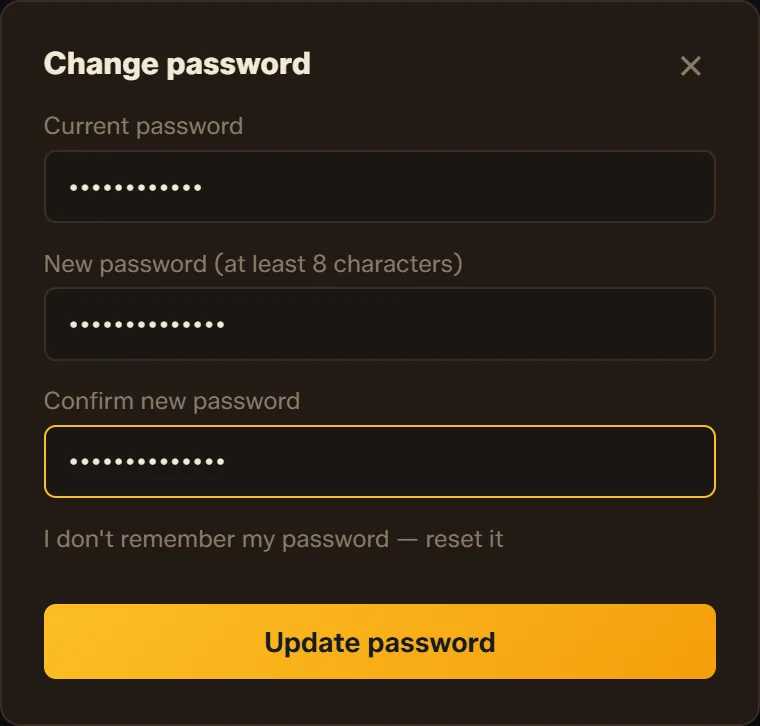
Type your password in Current password.
-
Type your new password in New password, at least 8 characters. Type it again in Confirm new password.
-
Click Update password. The screen shows Password updated..
If you don’t remember it
- On the sign-in screen, click Forgot password.
- Type your email address and click Send reset link.
- Open the link in your inbox. It is valid for 1 hour and works once.
- Type your new password twice and click Update password.
If it doesn’t work
- My new password isn’t accepted.
- It needs at least 8 characters, the same text in both fields, and it must differ from your current password.
- The reset email didn’t arrive.
- Check your spam folder first, and make sure you typed the address you signed up with. The screen shows the same message whether or not an account exists. If it still doesn’t come, write to hello@dekupa.com.
- It says the link is invalid.
- A link stops working after 1 hour or once it has been used. Once one link is used, any other links you asked for stop working too. Request it again with Forgot password.